Grading
Move cards and comics through grading, and decide what's worth submitting.
Grading is its own surface because it's a multi-step process with real cost and lead time. Sereal tracks each item through the pipeline, stamps the dates for you, and folds the grading fee into your cost basis when the item comes back.
The pipeline
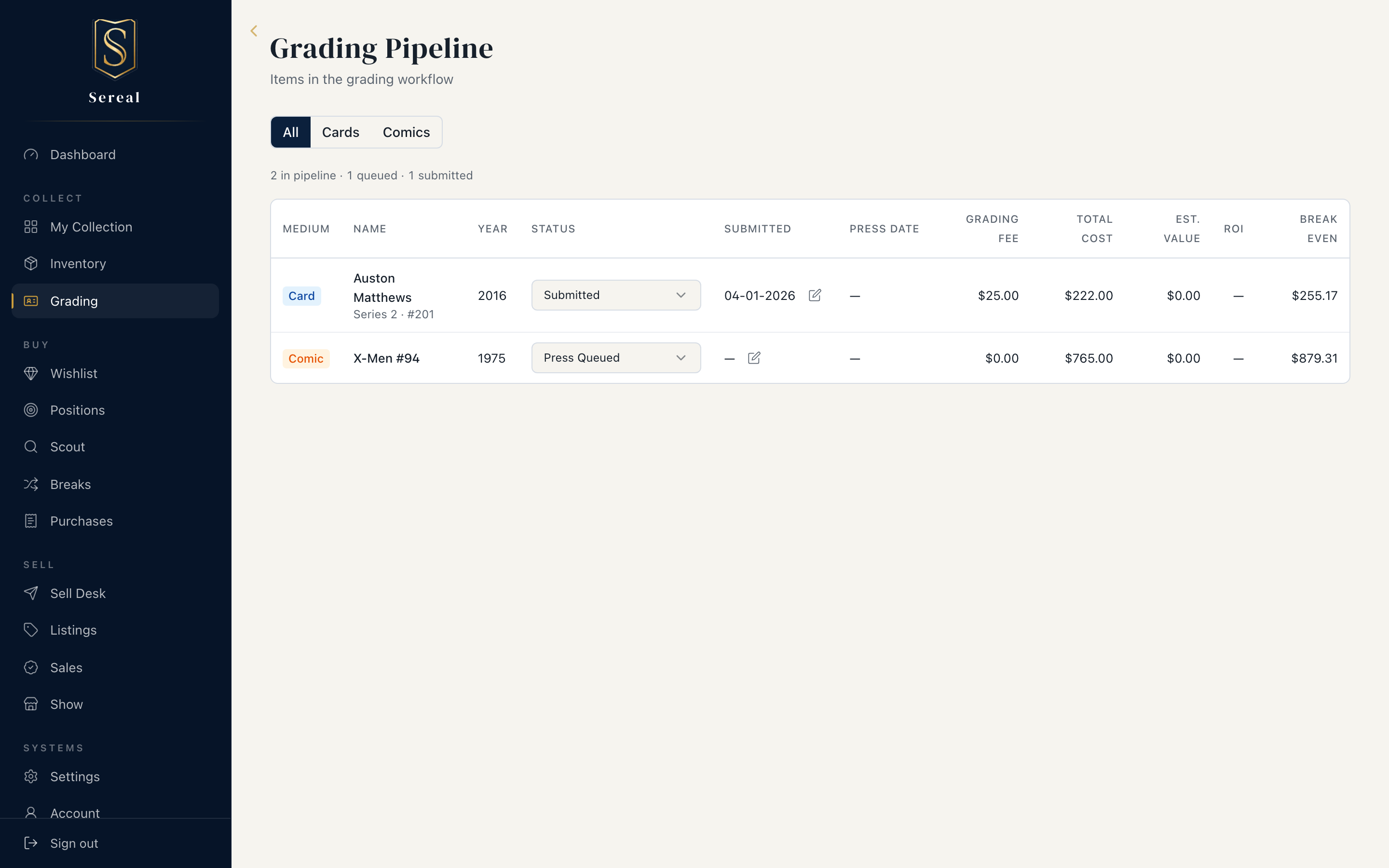
Items move left to right; Sereal sets the date on each transition so you always know how long something's been out.
Cards
Queued → Submitted → GradedComics (the pressing path is built in)
Press Queued → Submitted for Pressing → Returned from Press →
Grade Queued → Submitted → Graded
Work the pipeline from the Grading page: each row has a status dropdown, and the medium toggle (All / Cards / Comics) keeps the two flows separate. An item stays on the pipeline until it's Graded, then drops off — it's back in your Collection with a grade.
Finalizing a grade
When an item comes back, Finalize it:
- Cards — enter the grade, the cert number, and (optionally) the grading fee.
- Comics — enter the CGC grade with its label (e.g.
9.8 NM/MT,9.6 NM+), the cert number, and an optional fee. Flag restoration only if the book has actual restoration (color touch, piece replacement, and the like) — it's a value-affecting disclosure, and a separate field from pressing.
Pressing is not restoration. Pressing is a workflow step you choose when you add the comic ("Send for pressing before grading?"), and the pipeline tracks it through Submitted for Pressing → Returned from Press. A pressed book is not restored — set the restoration flag only for genuine restoration work.
The fee is added to the item's cost basis, so your P&L reflects what grading actually cost you. Cert numbers enable PSA/CGC verification from the item detail view.
Should you grade it? (Flip Check)
Grading only pays off if the graded comp clears the raw comp plus the fee. Grading Flip Check helps you decide before you spend: enter the population / gem-rate inputs and Sereal runs a two-scenario expected-value estimate, then gives a verdict chip:
- Grade — the math favors submitting.
- Maybe — marginal; depends on the grade you actually hit.
- Skip — the spread doesn't cover the fee at the grades you're likely to get.
- Skip — no upside — structural: even at the best possible grade the comp can't clear cost plus fees, so grading can't pay off regardless of how the book turns out. (Plain Skip is a close call; this one isn't.)
Treat it as a decision aid, not a guarantee — it's only as good as the comps you feed it.
Next
Once an item is graded and you're ready to move it, see Selling.